


Paint by Number: Coloring Game
4.8637.00 Reviews
App Specs
- Version
- 5.1.13
- Updated On
- License
- Free
- Downloads
- 5,000,000+
- Developer
- Oakever Games
- Categories
- Casual
- Platform
- Android
Screenshots
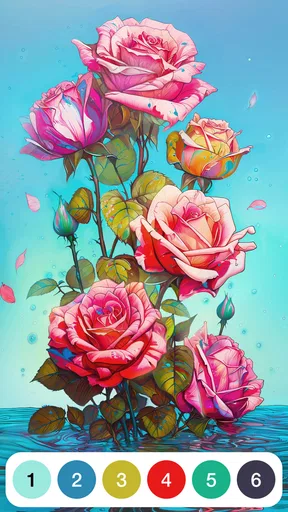



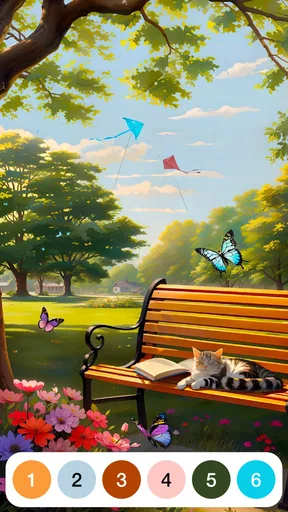
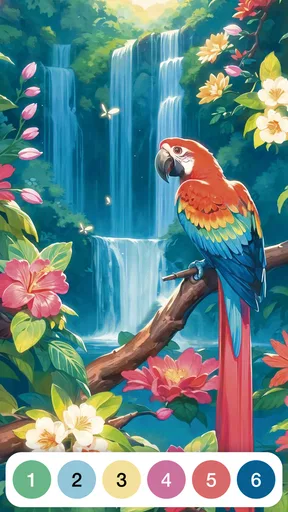


 Analysis by AppCompare
If you’re looking to unwind and let your creativity flow, Paint by Number: Coloring Game might just be the perfect app for you. Imagine a digital coloring book that fits right in your pocket, ready to keep you entertained and relaxed anytime, anywhere. Let me walk you through my experience with this vibrant app and why it might be a fantastic addition to your daily routine.
Why the numbered-coloring idea works
The appeal here is not having to invent a picture or choose every color yourself. A numbered section points you toward a particular color, so the creative task becomes a sequence of small, clear decisions: find a matching area, tap it, and watch the image take shape. I find that structure useful when I want a quiet activity but don’t have the energy to plan a drawing from scratch.
That also makes this a different kind of casual game from one built around quick reactions, competition, or solving a difficult puzzle. The reward is gradual visual progress rather than a high score. If you want a game that keeps your hands busy while your attention can drift in and out, this format is a natural fit. If you want demanding challenges or complete control over the artwork, it may feel too guided.
A Splash of Color at Your Fingertips
The moment you open Paint by Number, you’re greeted with a stunning gallery of beautiful images waiting to be brought to life. From whimsical landscapes to adorable animals, there’s something for everyone. The app’s interface is clean and intuitive, making it super easy to navigate even if you’re not exactly tech-savvy. Just tap on an image, and you’re off to the races.
Easy Peasy Lemon Squeezy
The beauty of this app lies in its simplicity. Each image is broken down into numbered sections, and your job is to fill each section with the corresponding color. It’s as simple as tapping on the screen, which makes it accessible for users of all ages. No artistic skill required! It’s like coloring by numbers, but without the hassle of sharpening pencils or worrying about staying inside the lines.
In practice, that low barrier is what makes it easy to fit into short breaks. I can choose a picture and make a little progress without needing to set up materials or remember a complicated sequence of moves. A useful habit is to treat a session as a pause rather than a task to finish: color for a few minutes, stop when attention wanders, and return when another small break appears. That keeps the experience relaxed instead of turning completion into homework.
The trade-off is that tapping numbered regions is still repetitive. On a picture with many small areas, the activity can become more about locating the remaining pieces than making creative choices. If I’m after hands-on drawing practice, experimenting with brushwork, or choosing a palette from a blank canvas, a traditional art app or paper coloring book is a better match. This game gives structure and convenience, not the same freedom as making an image entirely on my own.
Worth Reading Before You Choose

Flipboard Shows What News Apps Must Do Beyond the Feed

Switching to Android Auto Means Rethinking Your Driving Routine

Google Calendar Makes a Crowded Week Easier to Manage

Ludo King Makes the Most of the Minutes Between Plans

Baby Panda World Brings Quick Play to Modern Phones, but Its Game Library Feels Busy

ESPN’s Live Game View Makes Following Close Games Easier
A Stress-Free Zone
What I love most about Paint by Number is how therapeutic it feels. Coloring is a proven stress reliever, and this app takes it to the next level by providing a seemingly endless array of images to color. Whether you’ve had a long day at work or just need a break from reality, losing yourself in a sea of colors can be incredibly calming.
A realistic use for me is the quiet stretch after dinner, when I want to put aside work thoughts without starting a show or a longer game. I can settle on one image and focus on the next visible patch instead of worrying about the whole picture. It also suits a waiting-room pause or a short ride as a passenger, where a self-contained activity is easier than one that demands a long uninterrupted session. I would still avoid treating it as a guaranteed way to relax: if repetitive tapping irritates you, or you prefer activities with conversation and movement, the calm may not land.
Plus, the app offers a variety of categories to explore. Are you in the mood for a bit of fantasy, or perhaps something more realistic? Whatever your preference, there’s a category that will suit your mood.
Choosing a picture and keeping a comfortable pace
When I’m deciding what to color, I’d pick an image based on the time and attention I have rather than choosing only by subject. A picture that looks appealing is a good start, but a detailed image can ask for more repeated taps than I want during a brief break. For a quick session, it makes sense to choose something that looks manageable; for a longer, quieter stretch, a more involved picture can give the activity a clearer sense of progression.
Another practical tip is to stop at a natural point rather than push through just to see the finished result. The point of this kind of game is the small, steady process, and a partly colored picture is still a useful stopping place. This matters especially if you’re using it to wind down before bed: the app can be a gentle alternative to a more intense game, but it is still screen time, so I’d keep the session as short as feels comfortable.
Stay in the Loop with New Additions
One of the things that keeps me coming back to this app is the regular updates with new images. There’s always something fresh to look forward to, ensuring that the app never feels stale. The developers do a great job of keeping the content varied and exciting, which is a huge plus in my book.
Oakever Games is the developer, and the game is currently at version 5.1.3. The practical benefit of returning to a familiar coloring format is that I don’t have to relearn the basic activity each time I open it. New pictures can give regular players another subject to choose from, though freshness alone won’t solve the main limitation for someone who dislikes tapping through numbered sections. I’d think of new content as more choice within the same core routine, not as a change into a different kind of game.
Sharing is Caring
Once you’ve completed an image, you can save it to your device or share it directly with friends and family. It’s a wonderful way to show off your artistic prowess and perhaps even inspire someone else to try their hand at digital coloring. The app does a fantastic job of rendering your completed images beautifully, making them perfect for sharing on social media.
That gives a finished picture a second use beyond the coloring session: it can be something personal to keep or a small thing to send to someone who enjoys the same subject. I’d see sharing as an optional bonus, not the main reason to play. If you prefer to keep a private, low-pressure hobby, you can simply enjoy the process without turning every finished image into a post or a conversation starter.
Free with Optional Purchases
Paint by Number is free to download, which is great if you’re looking to try it out without any commitments. However, it does offer in-app purchases for those who want to unlock premium content or remove ads. Personally, I found the free version quite generous, but if you’re a coloring enthusiast, the premium options might be worth considering.
The listed in-app purchases range from $4.99 to $69.99 per item, so I’d approach them as optional spending rather than assume they are necessary to enjoy the basic idea. Since the core appeal is the act of filling numbered spaces, I’d first try the free version and see whether I actually return to it. If I do, I can then decide whether any paid option offers something I personally want; if not, there’s no reason to spend simply because an image or purchase is presented as an upgrade.
The game is free, has an Everyone age rating, and is available for devices running Android 7.0 or later. Its average rating is 4.6 from around 5,200 ratings, with about 322 written reviews and more than 1 million installs. Those figures suggest that many people have tried it, but they can’t predict whether its calm, repetitive style will suit you. I’d judge it by whether you enjoy the first few coloring sessions, not by popularity alone.
Who will enjoy it, and who may want another kind of game
I’d recommend it to someone who wants a straightforward creative pastime, likes seeing a picture gradually fill in, and values being able to start without artistic experience. It can also suit a family looking for an approachable activity across age groups, given its Everyone rating, though each person’s patience for repeated tapping will differ. The game is less suited to anyone who wants open-ended drawing, a strong competitive element, or a constantly changing challenge that tests speed and strategy.
Compared with paper coloring, this is easier to carry and doesn’t require pencils, pages, or cleanup, but it replaces the feel of physical materials with screen tapping. Compared with freeform drawing apps, it removes much of the intimidating blank-page choice but gives up control over the composition and palette. And compared with fast-paced casual games, it is deliberately slower and less demanding. Those are not flaws for every player; they define the kind of break it offers.
In conclusion, Paint by Number: Coloring Game is a delightful app that offers a relaxing escape into the world of colors. Whether you’re a seasoned artist or someone who just loves to color for fun, this app has something to offer. It’s easy to use, regularly updated, and perfect for those moments when you just need to unwind. So why not give it a try? You might just find a new favorite pastime!
Pros
- Intuitive interface and easy to navigate.
- Wide variety of coloring themes available.
- Daily updates with new artworks.
- Relaxing and stress-relieving experience.
- Offline mode for coloring on the go.
Cons
- Contains frequent in-app ads.
- Limited free content without subscription.
- Some images require purchase to unlock.
- Occasional app crashes reported by users.
- Requires internet for certain features.
FAQs for Paint by Number: Coloring Game
What is the main objective of Paint by Number: Coloring Game?
Paint by Number: Coloring Game is designed to provide a relaxing and enjoyable experience by allowing users to fill in artwork using numbers as a guide. Each number corresponds to a specific color, making it easy for users of all ages to create beautiful images without needing advanced artistic skills. It's perfect for unwinding and expressing creativity.
Is Paint by Number: Coloring Game suitable for children?
Yes, Paint by Number: Coloring Game is suitable for children, as it offers a simple and intuitive interface that makes it easy for kids to use. The app provides a wide variety of designs that cater to different age groups, ensuring that children can enjoy the app while developing their motor skills and color recognition.
Does Paint by Number: Coloring Game require an internet connection?
The app does not require a constant internet connection for basic coloring activities, as users can download images to complete offline. However, an internet connection may be needed to access new updates, download additional coloring pages, or engage in any community features that the app may offer.
Are there any in-app purchases or ads in Paint by Number: Coloring Game?
Yes, Paint by Number: Coloring Game offers in-app purchases and contains ads. While the basic version of the app is free, users can purchase additional coloring pages, tools, or features. The app may also display ads, but users can opt to purchase an ad-free experience via a subscription or one-time payment.
How can I save or share my completed artwork in Paint by Number: Coloring Game?
After completing a piece of artwork, Paint by Number: Coloring Game allows users to save their masterpieces directly to their device's gallery. Additionally, the app provides easy sharing options to post your creations on social media platforms or send them via messaging apps, so you can proudly display your artistic achievements to friends and family.


